Power of Z-SUITE
for Zortrax LPD & LPD Plus technology

Automatic triangle mesh repair. Models with a damaged triangle mesh are automatically fixed.
Editable supports. Supports can be manually added or removed where necessary.
Thin walls detection. Walls too thin to be printed properly are highlighted in red.
Rotation optimization tool. Model's position on the build platform can be automatically optimized.
Zcodex replication. Already sliced models can be easily replicated with the same printing settings.
Splitting models. Models can be cut along a chosen plane to split them into parts or remove some of its components.

Undo functionality. All actions can be undone by pressing a Ctrl+Z combination on the keyboard.
Ultimate compatibility. Z-SUITE is compatible all major 3D modeling programs and supports files in .stl, .obj, .dxf, and .3mf formats.
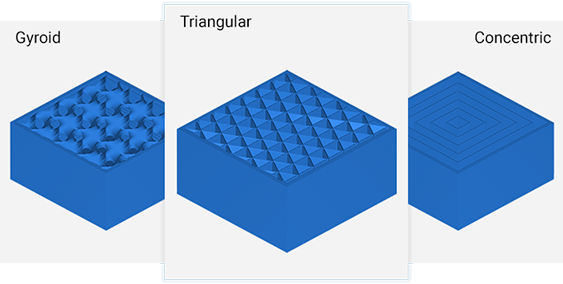
Multiple infill options. Wide variety of infills allow optimizing the models density from very low to solid.
Dimensional correction. Offset outer contour and holes helps correct dimensions of the model's outer walls or holes.
Raft-free 3D printing. Models and their support structures can be place directly on build platform without a raft.
Power of Z-SUITE for Zortrax UV LCD technology
and third-party LCD 3D printers
Z-SUITE is optimized for Zortrax Inkspire and compatible with all third-party LCD 3D printers. It now offers all crucial functionalities readily available in one, powerful tool.
Rotation optimization tool
Model's position can be automatically optimized to maximize the area touching the build platform, minimize the amount of support, and more.
Editable supports
Supports are automatically generated to match the model's geometry and can be edited manually to prevent failed prints.
Hollow infill
Hollow infill type infill and a capability to add cavities in the model are great resin-saving features.
Raft-free printing
Models and their support structures can be placed directly on the build platform without a raft.
Split tool
Loaded models can be split into parts and unnecessary areas can be removed with Split tool.
Undo functionality
Pressing a Ctrl+Z combination takes back the last performed action.
Overhangs highlighting
Overhangs that need to be supported are highlighted in red.
Overgrowth correction
Model’s outer dimensions can be decreased and holes enlarged with 1 pixel corresponding to 0.1 mm on both sides in total.
Antialiasing
Model's edges can optionally be smoothed with antialiasing.
Printing profiles
Printing settings can be saved as profiles and quickly reused.
Replication tool
Already processed model can be quickly replicated with the same printing settings and supports.
Additional supports exposure
Additional UV exposure time can be set for supports on Zortrax Inkspire.
3D printing farm management
Z-SUITE is a wireless command center of smart, reliable Zortrax 3D printers with Wi-Fi capability. Simply connect all devices into a 3D printing farm and start working more efficiently.
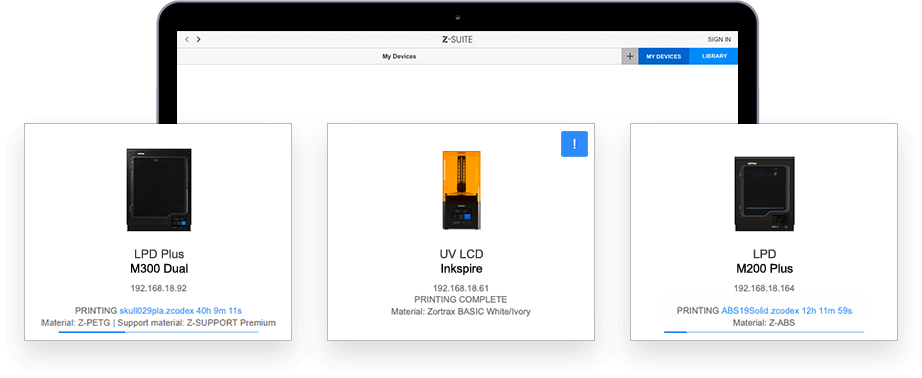
Print wirelessly
Become a Z-SUITE BETA tester and help us
make the next release of Z-SUITE our best yet
Take your part in shaping our software by test-driving pre-release versions and letting us know what you think.
Download Z-SUITE 3 BETA